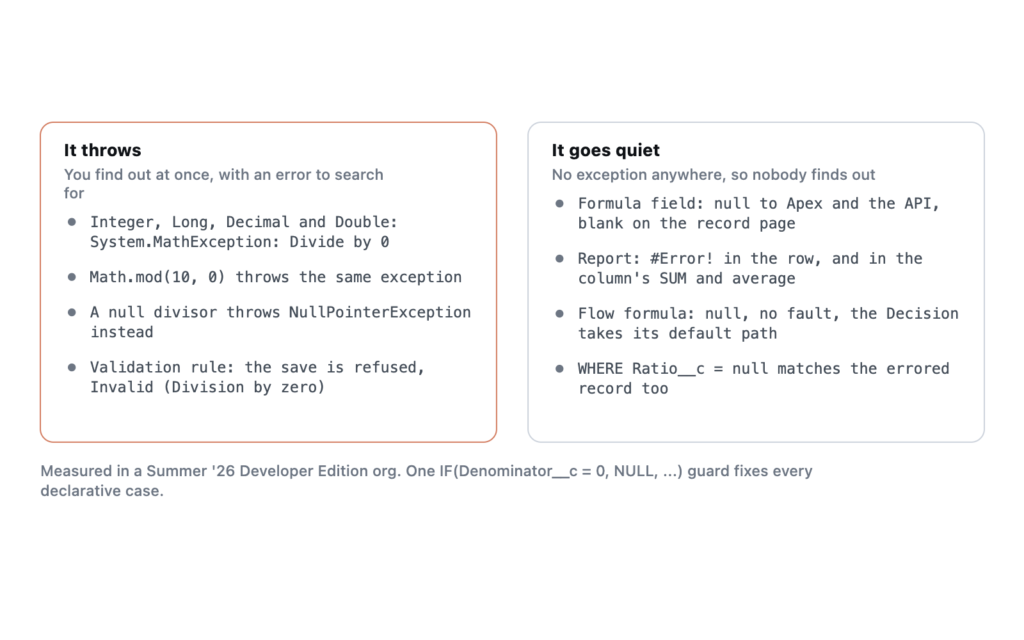
Apex throws System.MathException: Divide by 0 for every numeric type, including Double, so there is no type you can switch to that returns Infinity instead. The fix in code is a guard before the division. The harder part is the declarative side. Formula fields, flow formulas and validation rules each react to a zero divisor differently, and none of them throws the exception you would search for.
System.MathException: Divide by 0Everything below was run in my own Developer Edition org on Summer ’26, API version 67.0, against a throwaway custom object with a numerator, a denominator and three formula fields dividing one by the other.
Every Apex number type throws it
If you have written Java you might expect floating-point division to return Infinity. Apex does not. I divided ten by zero in each type inside a try/catch and printed what came back.
| Expression | Result |
|---|---|
Integer 10 / 0 |
System.MathException: Divide by 0 |
Long 10L / 0L |
System.MathException: Divide by 0 |
Decimal 10 / 0, and 10.divide(0, 2) |
System.MathException: Divide by 0 |
Double 10.0 / 0.0, and 0.0 / 0.0 |
System.MathException: Divide by 0 |
Math.mod(10, 0) |
System.MathException: Divide by 0 |
Decimal 10 / null |
System.NullPointerException: Argument cannot be null. |
Decimal null / 5 |
System.NullPointerException: Attempt to de-reference a null object |
The two null rows matter for the fix. A guard that only checks for zero still lets a null through, and you trade one exception for a NullPointerException, with a different message depending on which side of the division was null.
Where the zero comes from
Start with any rate calculated from record fields, such as revenue per employee or margin per unit. Zero is a legitimate value for those fields. The code was tested against records where it wasn’t.
The second is an average over an empty collection. total / items.size() works until a query returns nothing. The third is Math.mod on a value somebody typed in, which fails the same way.
One guard covers all three, and it checks both sides for null as well as the divisor for zero.
public static Decimal safeDivide(Decimal numerator, Decimal denominator) {
    if (numerator == null || denominator == null || denominator == 0) {
        return null;
    }
    return numerator / denominator;
}
Returning null rather than zero is deliberate. A ratio of zero is a real answer that says something about the record. “Could not be calculated” means something else entirely, and collapsing the two makes the report wrong in a way nobody notices.
The exception is catchable. catch (MathException e) picked it up in my tests, unlike a governor limit exception. Catching it is still the wrong fix when you can see the zero coming.
Formula fields go blank, and reports say #Error!
A formula field that divides by zero never throws. What you see depends entirely on where you look, which is how the same record can look fine to one person and broken to another. I created a record with a numerator of 10 and a denominator of 0, then read the formula everywhere it surfaces.
| Where you read it | What you get |
|---|---|
| Apex, SOQL, REST API, UI API | null |
| Lightning record page | An empty field |
| List view | An empty cell |
| Report detail row | #Error! |
| Report SUM and average of that column | #Error! for the whole column |
Only the report admits anything is wrong, and the last row is the one that hurts. One bad record out of three turned the report’s total and average into #Error!, so a dashboard built on that column shows nothing useful at all.
The API side has its own trap. WHERE Ratio__c = null matched the divide-by-zero record alongside the genuinely blank one, because the API has no way to tell an error from an empty value.
The blank-field setting changes which records fail. With “Treat blank fields as zeroes”, a record whose denominator was simply empty also showed #Error! in the report, because the blank became a zero before the division ran. With “Treat blank fields as blanks” the same record showed an ordinary blank, which means that if you use the zeroes setting on any formula that divides, every record with an empty denominator is a divide-by-zero waiting for a report to find it. See the row-level formulas piece for the report-side version of this.
The formula guard follows the same logic as the Apex one.
IF(Denominator__c = 0, NULL, Numerator__c / Denominator__c)With blanks treated as zeroes, that one expression catches both the zero and the empty field, and the report shows a blank instead of #Error!.
A validation rule that divides by zero blocks the save
This surprised me. I wrote a validation rule that fires when the ratio is above 100, with no guard, and saved a record with a zero denominator. The save failed, and the message it showed was not the one I wrote.
FIELD_CUSTOM_VALIDATION_EXCEPTION, Validation Formula "Ratio_Ceiling_Reversed" Invalid (Division by zero)The user sees the rule’s API name and a phrase about division, with no idea what to change. It surfaces as a FIELD_CUSTOM_VALIDATION_EXCEPTION in Apex and integrations, which sends people hunting for the wrong rule logic.
Order matters. Operand order inside AND() decides whether it happens, so I wrote two versions of the rule. AND(Name = 'VR', Numerator__c / Denominator__c > 100) only blocked records named VR, and every other record saved normally with a zero denominator. AND(Numerator__c / Denominator__c > 100, Name = 'VR2') blocked every record with a zero denominator, whatever its name. Evaluation stops at the first false condition, so a cheap condition placed first protects the division behind it. I would still add the explicit zero check, because the next person to edit the rule has no way of knowing the ordering was holding anything up.
Flow formulas return null and skip the fault path
I built an autolaunched flow with a formula resource of {!numerator} / {!denominator} and called it from Apex with a denominator of 0. The flow finished successfully. The output variable was null. There was no fault, so there was no error email and nothing reached a fault path.
That is the worst of the four behaviours. The failure travels. I added a Decision after the formula that checks whether the ratio is greater than 5. With a denominator of 1 it took the “Above Five” outcome. With a denominator of 0 it took the default outcome, and the flow carried on with no record that anything went wrong. Guard the formula in the flow the same way, or check the denominator in a Decision before the formula is used.
What I have not tested
Treat this as one data point. These results come from one Developer Edition org with single currency. I have not checked a currency formula in a multi-currency org, or a screen flow that displays the formula directly to a user. If you see different behaviour in either, the probe takes about ten minutes to rebuild.
Frequently asked
Can I catch Divide by 0? Yes. It is an ordinary MathException and a try/catch handles it, which a governor limit exception never allows. A guard is still better, because you know in advance which values cause it.
Why does 7 / 2 give me 3? Both operands are Integers, so Apex does integer division and drops the remainder. I got 3 for 7/2 and 3.5 for 7.0/2. Make one operand a Decimal when you want the fraction.
Does a report filter exclude the error rows? In SOQL, = null included them. I did not test report filters, so check yours against a known bad record before trusting the totals.
Is a null numerator safe? No. null / 5 threw Attempt to de-reference a null object for both Decimal and Integer, which is why the guard above checks both sides.
Reference: Apex Developer Guide, Math class and primitive data types. Salesforce Help, Common Formula Errors and Formula Field Properties. Tested in a Summer ’26 Developer Edition org, 29 September 2026.


