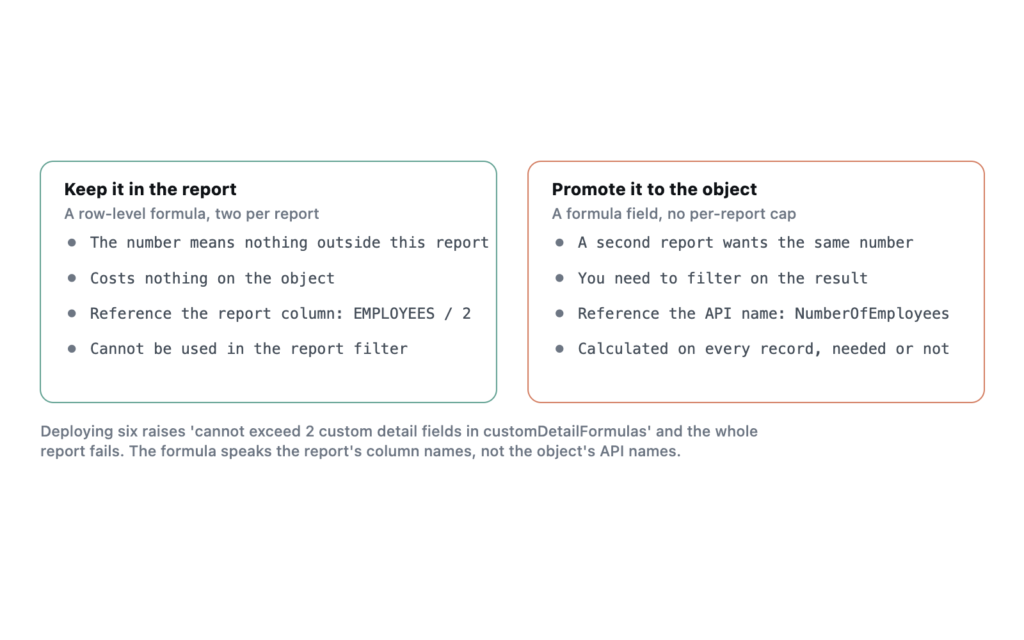
The quick version: a Salesforce report accepts two row-level formulas. Ask for a third and the metadata deploy rejects the whole report. Inside the formula you reference the report’s column name rather than the field’s API name, which is the part that costs people an afternoon.
Both facts came out of deploying real reports to my own Developer Edition org on API 67.0, Summer ’26.
Two is the cap, and it is enforced at deploy
I built one report carrying six row-level formulas, expecting either a warning or a silent truncation. Neither happened.
Report  TA_Probe/TA_RLF_Six
cannot exceed 2 custom detail fields in customDetailFormulas
The whole component fails. Nothing partial lands. customDetailFormulas is the metadata name for what the report builder calls a row-level formula, and two is the ceiling per report.
That is a tighter budget than most people expect, and it is the main reason row-level formulas are not a general-purpose replacement for a formula field. A formula field on the object is unlimited by comparison, reusable across every report, and indexable in ways a report formula never is. Row-level formulas earn their place when the calculation is specific to one report and you do not want to add a field to the object to get it.
The formula references the column, not the field
This is where I lost the most time. A row-level formula on an Account report that divides the employee count looks like it should use the field’s API name. It does not.
Three attempts, three identical rejections:
NumberOfEmployees / 1
  -> Field NumberOfEmployees does not exist. Check spelling.

Account.NumberOfEmployees / 1
  -> Field Account.NumberOfEmployees does not exist. Check spelling.

ACCOUNT.EMPLOYEES / 2
  -> Field ACCOUNT.EMPLOYEES does not exist. Check spelling.
The one that deployed used the bare report column token.
<customDetailFormulas>
    <calculatedFormula>EMPLOYEES / 2</calculatedFormula>
    <dataType>Double</dataType>
    <developerName>RLF_V1</developerName>
    <label>Row Formula V1</label>
    <scale>2</scale>
</customDetailFormulas>
Note the mismatch. The column entry above it is <field>EMPLOYEES</field> and the formula says EMPLOYEES, while the underlying Account field is NumberOfEmployees. The report layer has its own vocabulary and the formula speaks that one.
“Check spelling” is poor advice from the error message, because the spelling was right and the namespace was wrong. If you are hitting this, open the report in the builder and look at what the column is actually called there.
Where row-level formulas beat the alternatives
A row-level formula calculates per detail row, which puts it between two things people confuse it with.
- A formula field lives on the object, is calculated on every record whether or not a report needs it, and is available everywhere. Use one when more than a single report wants the number.
- A row-level formula lives in the report, calculates on the rows the report returned, and costs nothing on the object. Two per report.
- A summary formula calculates at group and grand-total level rather than per row. Reach for it when the answer is about the group.
The practical test is whether the number would mean anything outside this report. Days between two dates on the record means something everywhere, so it belongs on the object. Percentage of the filtered set that this row represents means nothing outside the report, so it belongs in the report.
Limits worth knowing before you design around them
Beyond the cap of two, row-level formulas cannot reference other row-level formulas, and they cannot be used in the report filter. The filter runs before the formula does, which is a source of genuine frustration when what you want is to show only the rows where the formula exceeds a threshold. Bucket fields have the same ordering problem.
The workaround most teams land on is to promote the calculation to a formula field on the object, which restores filtering and removes the cap. That is an admission that the report-level version did not fit, and it is usually the right call once a second report wants the same number.
What I have not tested
I verified the cap and the reference syntax through the Metadata API. I have not measured whether two row-level formulas materially slow a report over a large result set, which is the question I would want answered before putting them on anything reporting across millions of rows. Report performance has more on what actually costs time there.
Frequently asked
Can I use a row-level formula in a joined report? Row-level formulas are not available in joined reports. The builder hides the option rather than explaining it.
Do they work in matrix and summary reports? Yes, on the detail rows. They are hidden when the report is collapsed to show groupings only, because there are no detail rows to calculate against.
Does the cap of two count per report or per report type? Per report. The error is raised against the report component, and a second report on the same report type gets its own two.
Can they reference fields not shown as columns? Yes, as long as the field is available on the report type. The column does not have to be displayed for the formula to use it.