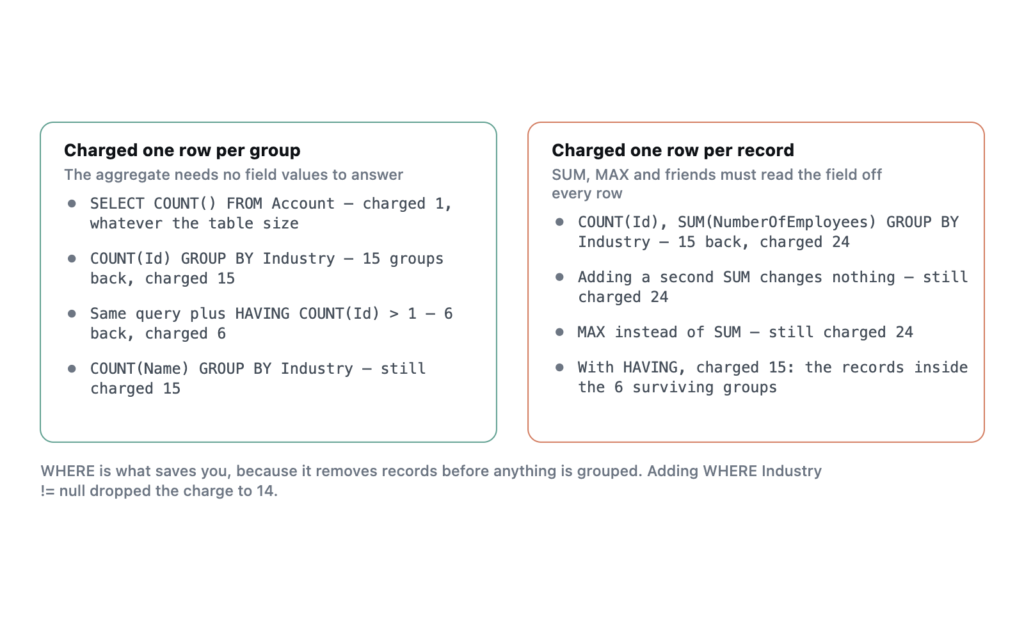
The short version: an AggregateResult query does not charge you one query row per record, and it does not reliably charge you one per group either. COUNT(Id) charges one row per group returned. The moment you add SUM, MAX or any other aggregate that has to read a field value, you are charged one row for every underlying record inside the groups you got back.
The rule is in the Apex Developer Guide, in one sentence most people skim. The difference it describes decides whether an aggregate query is a way around the 50,000 query row limit or just a slower way to hit it, so the numbers below are what it looks like measured.
The measurements
Everything below was run as anonymous Apex in my own Developer Edition org on API version 67.0, which is Summer ’26. The org holds 24 Accounts spread across 15 distinct values of Industry, counting the null group. Six of those groups hold more than one record and the remaining nine hold exactly one.
Each query was measured by reading Limits.getQueryRows() immediately before and after it, so that every number below is the cost of that one statement rather than a running total, which matters because the counters accumulate across a transaction and are easy to misread. No trigger or flow ran in between.
Integer b = Limits.getQueryRows();
AggregateResult[] g = [SELECT Industry, COUNT(Id) c FROM Account GROUP BY Industry];
System.debug('returned=' + g.size() + ' charged=' + (Limits.getQueryRows() - b));
Here is what each one cost, against 24 Accounts.
| Query | Rows returned | Query rows charged |
|---|---|---|
SELECT COUNT() FROM Account |
n/a, returns 24 | 1 |
SELECT Id, Name, Industry FROM Account |
24 | 24 |
SELECT COUNT(Id) FROM Account |
1 | 1 |
... COUNT(Id) ... GROUP BY Industry |
15 | 15 |
... COUNT(Id) ... GROUP BY Industry HAVING COUNT(Id) > 1 |
6 | 6 |
... COUNT(Id), SUM(NumberOfEmployees) ... GROUP BY Industry |
15 | 24 |
... COUNT(Id), SUM(NumberOfEmployees) ... GROUP BY Industry HAVING COUNT(Id) > 1 |
6 | 15 |
COUNT() is the cheapest row count on the platform
SELECT COUNT() FROM Account charged one query row while returning a count of 24. That holds at any table size. It is the right way to answer “how many” when you do not need the records.
The equivalent plain query charged 24, one per record, exactly as you would expect. On a table with 80,000 rows that plain query throws. The COUNT() still costs one.
A value aggregate charges per record, not per group
This is the part that surprised me, though it is documented in the Apex Developer Guide under “Working with SOQL Aggregate Functions”, in a sentence that is easy to read past. Every aggregate other than COUNT() and COUNT(fieldName) counts each row used by the aggregation against the row limit. Grouping 24 Accounts into 15 industries with COUNT(Id) charged 15, one per group. Adding SUM(NumberOfEmployees) to the same query, with the same GROUP BY and the same 15 rows coming back, charged 24.
Nine extra rows for one extra column.
Twenty-four is the number of Accounts in the org. Adding a second aggregate function alongside the first made no difference at all, still 24, so this is not a charge levied once per aggregate function in the select list. Swapping SUM for MAX gave 24 again. COUNT(Name) charged 15.
The cost tracks whether the platform had to read field values off the underlying records to compute your answer. Counting does not require that. Summing does.
HAVING narrows the bill, and the arithmetic is exact
Adding HAVING COUNT(Id) > 1 cut the returned groups from 15 to 6. With COUNT(Id) alone the charge fell to 6. With SUM in the select list the charge fell to 15.
Fifteen is not an obvious number until you look at the shape of the data. Of the 15 groups, 6 hold more than one Account, and those 6 groups contain 15 Accounts between them. The other 9 are singletons. The charge was the record count inside the groups that survived the filter.
I checked that rather than assuming it. I counted the records in the multi-record groups first, predicted the charge, then ran the query:
groups total=15 multi=6 singleton=9
records inside the multi groups = 15
PREDICTION: HAVING COUNT(Id)>1 with a value aggregate should charge 15
ACTUAL charged = 15 (returned 6 groups)
The prediction held exactly. The documented rule and the measurement agree, and the practical form of it is that a value aggregate charges you for every record feeding a group you were actually given, while a count aggregate charges you once per group.
What this changes about how you write the query
If you are reaching for an aggregate query specifically to stay under the row limit on a large object, then the select list matters more than the grouping does, which is the opposite of how most people reason about it. Watch the select list.
COUNT(Id)with aGROUP BYis safe as long as the grouping field has low cardinality. Group by a picklist and you pay a handful of rows. Group byOwnerIdin an org with 4,000 users and you pay up to 4,000.- A
SUMorAVGover a large filtered set is not a way around the limit. You will be charged for the records behind it regardless of how few groups come back. WHEREis what saves you, because it removes records before anything is grouped. In my run, addingWHERE Industry != nulldropped both the returned groups and the charge to 14.- Where you genuinely need sums over volumes that will not fit, the answer is Batch Apex accumulating across chunks, or a rollup maintained as the data changes.
What I have not tested
All of this is one object, one org, and 24 records. I have not reproduced it above the row limit itself, so I cannot tell you from experience whether a value aggregate over 60,000 records throws Too many query rows: 50001 or is handled differently by the query engine. The arithmetic above says it should throw, and I would plan for that, but I have not seen it fail.
Nor have I tried it against a custom object carrying a custom index on the grouped field, which is where I would expect any deviation from the pattern above to show up first. The measurement takes two lines of anonymous Apex. Run it on a bigger org and correct me.
Frequently asked
Does COUNT() without a field really cost one row? It did in every run here. Note that COUNT() returns an Integer directly while COUNT(Id) returns an AggregateResult list, so they are not interchangeable in code even though both charged one row.
Do aggregate queries count against the 100 query limit? Yes, one each, the same as any other SOQL statement. The row charge and the statement count are separate budgets, which is worth remembering when you are instrumenting with the Limits class.
Is there a cap on how many groups come back? Salesforce documents a ceiling on the rows an aggregate query returns in the SOQL and SOSL Reference. I did not get near it with 15 groups, so I am not going to quote a number I have not hit.
Does this apply inside a SOQL for loop? Running the aggregate query as the source of a for loop charged exactly the same as assigning it to a list. The for-loop chunking that helps with heap does not change the row charge.


