It counts recipients: SINGLE_EMAIL_LIMIT_EXCEEDED means a send would take the org past its daily allowance of single-email recipients, and every address in To, Cc and Bcc counts. The allowance also includes recipients already queued earlier in the same transaction, so one large send can fail after several smaller ones succeeded. Read your org’s real number from the REST /limits resource before you plan around a published one.
Messaging.SendEmailError[getMessage=Email limit exceeded.;getStatusCode=SINGLE_EMAIL_LIMIT_EXCEEDED;getTargetObjectId=null;]

System.EmailException: SendEmail failed. First exception on row 0; first error: SINGLE_EMAIL_LIMIT_EXCEEDED, Email limit exceeded.: []
The first form comes back in a SendEmailResult when you call Messaging.sendEmail with allOrNone set to false, and the second is the exception you get when allOrNone is true, which is also the default if you pass nothing. Both of those, and everything else below, came from my own Developer Edition org on Summer ’26, API version 67.0, without a single email leaving the org. The last section explains how.
Read your org’s limit from /limits
Salesforce’s knowledge article on single email daily limits for Apex and the API gives 5,000 recipients a day for a standard org and says trial orgs default to 15. My Developer Edition org matched neither:
sf api request rest /services/data/v67.0/limits --target-org my-dev-org

"SingleEmail": { "Max": 500, "Remaining": 500 }
That is the number the platform enforces. The same response lists MassEmail and DailyWorkflowEmails as separate buckets, and this error is about SingleEmail only. Salesforce’s general email limits article says the daily count resets at midnight GMT. I have not watched a reset happen. The timing comes from that article.
What counts toward it
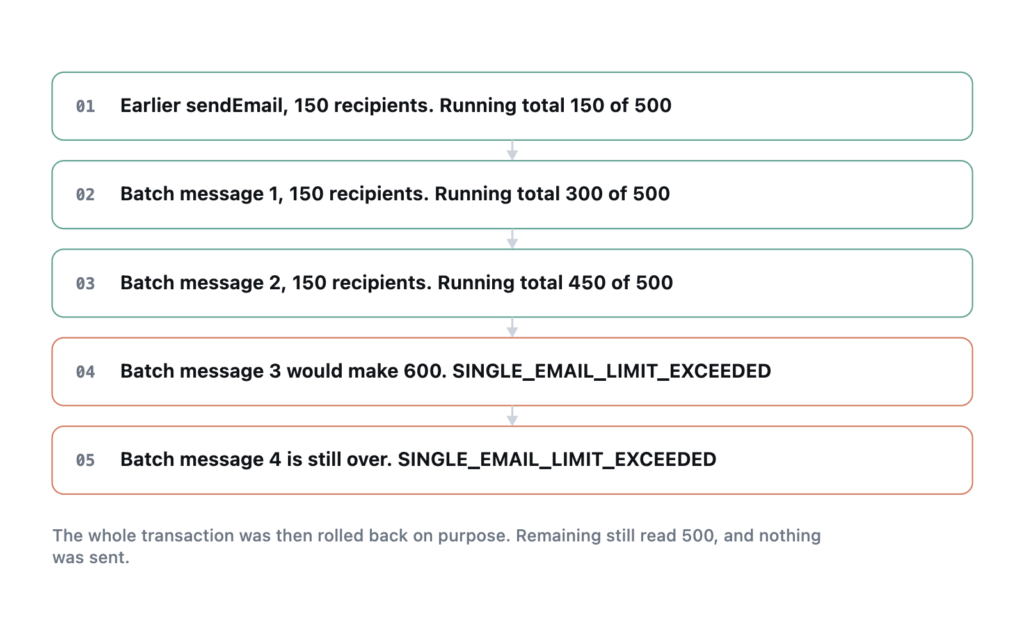
The limit counts recipients. I sent four messages of 150 recipients each in one sendEmail call, after an earlier single message of 150 in the same transaction. With a 500 allowance, the earlier message and the first two in the batch were accepted, making 450. The third would have made 600, so it failed with SINGLE_EMAIL_LIMIT_EXCEEDED, and so did the fourth.
Two things follow from that. Each message passes or fails whole. And the platform counts what this transaction has already queued before it looks at the daily total, so an earlier sendEmail call in the same trigger or batch execution uses up room the later one needed.
The knowledge article adds that addresses in Cc and Bcc count the same as To. It also says emails sent with setTargetObjectId() pointing at a User record do not count. I could not test it. My org’s only user has a real inbox. If your code is sending internal notifications to external-looking addresses, switching to setTargetObjectId(userId) is the first thing to try.
Two neighbouring limits throw different errors
People searching this error often have one of these instead.
| What you did | What you get | Transaction survives |
|---|---|---|
| Went past the daily recipient allowance | SINGLE_EMAIL_LIMIT_EXCEEDED, Email limit exceeded. |
Yes, with allOrNone false |
| Put 151 addresses on one message | LIMIT_EXCEEDED, There are too many recipients for this email. |
Yes, with allOrNone false |
Called Messaging.sendEmail 11 times in one transaction |
System.LimitException: Too many Email Invocations: 11 |
No, it cannot be caught |
A message with 150 recipients went through. At 151 it failed. That per-message error has nothing to do with your daily total.
The invocation limit is a governor limit of 10 calls per transaction, Limits.getLimitEmailInvocations() returned 10 in my org, and it fails on the 11th call no matter how many or how few recipients each of those calls carried. The fix is the usual bulkification one. Build a List<Messaging.SingleEmailMessage> and send it once, because one call can carry many messages.
reserveSingleEmailCapacity checks, and it holds nothing
Messaging.reserveSingleEmailCapacity(n) is meant to be called before you send. Asking for 500 in my org succeeded. Asking for 501 threw:
System.HandledException: The daily limit for the org would be exceeded by this requestTwo behaviours here are different from what the name suggests. First, it reserved nothing. After a successful call for all 500, a sendEmail in the same transaction still went through, so the method is a check you run before the send rather than a hold on capacity.
Second, the knowledge article says this exception cannot be caught in a try/catch while still saving the record. It can be. I inserted a record, called reserveSingleEmailCapacity(100000) inside a try/catch, wrote the exception message onto the record in the catch block, and updated it. The transaction committed and the record held the message. The article may describe older behaviour, but on Summer ’26 you can catch it and carry on.
try {
    Messaging.reserveSingleEmailCapacity(recipientCount);
} catch (HandledException e) {
    // Out of allowance for today. Record the job for a retry after midnight GMT
    // instead of failing the user's save.
    deferEmail(jobId, e.getMessage());
    return;
}
Messaging.sendEmail(messages, false);
Pass false for allOrNone and check each SendEmailResult. The check and the send are separate calls, so something else in the org can use the allowance between them, and a batch that fails as a whole is harder to retry than one that tells you which messages failed.
Testing this without sending anything
Every experiment above sent zero emails, and Remaining read 500 after each one. The technique is to run the send in anonymous Apex that ends by throwing an exception you do not catch:
Messaging.sendEmail(messages, false);
// inspect the results, then:
throw new HandledException('roll back on purpose');
The uncaught exception rolls the transaction back. The limit check still runs and the results still come back, but the allowance was never charged, which fits with queued email going out only when a transaction commits. I also used addresses ending in example.com.invalid, which cannot be delivered even if something goes wrong. Together those make it safe to reproduce the error in a developer org or sandbox. I would not run it in production, where one deleted line turns a probe into a real send.
What I have not tested
I have not tested sends from Flow’s Send Email action or from email alerts against this limit, the setTargetObjectId exemption, or behaviour after the daily count actually reaches its cap from real sends. My probes stopped at the check each time. A real exhaustion should produce the same error text, and the midnight GMT reset is Salesforce’s claim that I have not verified.
Frequently asked
Does a failed transaction use up my daily allowance? Not in my tests. Every rolled-back transaction left Remaining at 500, including ones where sendEmail had returned success before the rollback.
Does reserveSingleEmailCapacity consume capacity? No. It checks whether the number you pass would fit and throws if it would not. It reserved nothing that a later send in the same transaction had to respect.
How many recipients can one email have? 150 worked and 151 failed with LIMIT_EXCEEDED in my org. That is a per-message limit, separate from the daily one.
Where do I check how much is left today? /services/data/v67.0/limits, under SingleEmail. See monitoring API consumption for polling the same resource on a schedule.
Reference: Salesforce Help, Single Email Daily Limits for Emails Sent Using Apex and the API, and General Email Limits. Apex Reference Guide, Messaging class. Tested in a Summer ’26 Developer Edition org, 29 September 2026.


