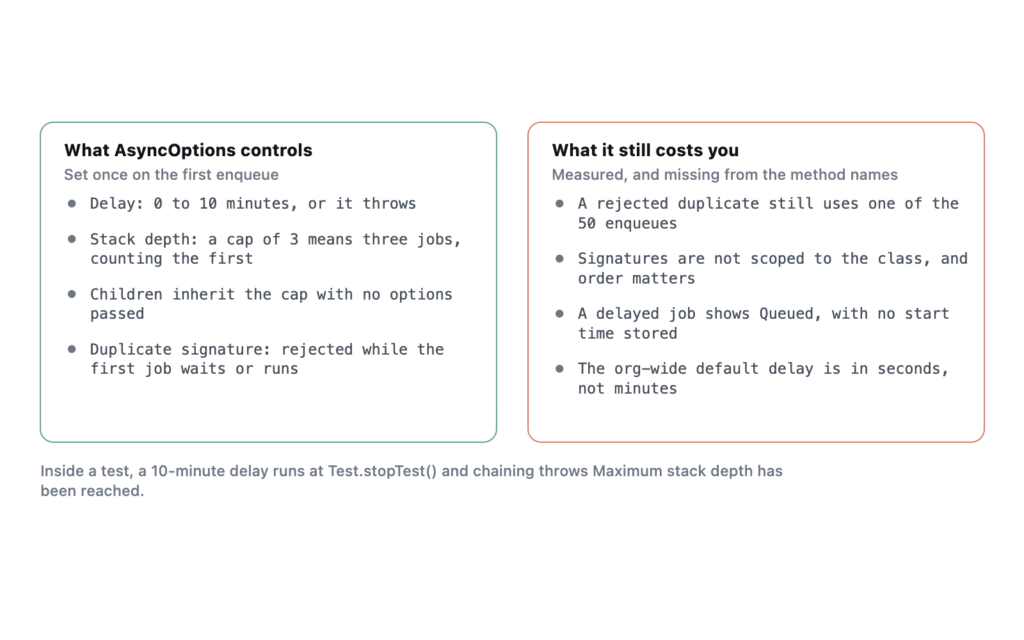
Tested on Summer ’26: System.enqueueJob(job, minutes) accepts a delay from 0 to 10 minutes and throws outside that range. AsyncOptions carries the same delay plus two more controls, a cap on chain depth and a duplicate signature that rejects a second copy of a job already waiting. The duplicate check works, but a rejected enqueue still counts against the 50 a transaction is allowed, which nothing in the method’s name suggests.
All of this arrived in Winter ’24. The results below come from anonymous Apex and a small probe class in my own Developer Edition org on API version 67.0, with each job writing what it saw to a record so the async output could be read back afterwards.
The delay is in minutes and stops at ten
The two-argument overload is the simplest form:
Id jobId = System.enqueueJob(new SyncJob(accountIds), 5);I tried the edges. Each failure is an ordinary exception you can catch, and none of them enqueued anything.
| Delay passed | Result |
|---|---|
| -1 | System.InvalidParameterValueException: Delay must be greater than or equal to 0 minutes |
| 0 | Enqueued, ran immediately |
| 10 | Enqueued, ran 10 minutes later |
| 11 | System.InvalidParameterValueException: Delay must be less than or equal to 10 minutes |
| null | System.NullPointerException: Argument 2 cannot be null |
The 10-minute job was enqueued at 12:54:28 UTC and completed at 13:04:28. On a quiet Developer Edition org the delay was exact to the second. The property is called minimum delay for a reason, though, and on a busy org I would treat ten minutes as the earliest the job can start rather than a time it will start.
While it waits, the job sits in AsyncApexJob with a status of Queued and a CreatedDate of the moment you enqueued it. I went through every field on the object and none of them holds the scheduled start time. If you need to show a user when the job will run, store the time yourself when you enqueue it.
There is an org-wide default, and it is in seconds
Setup → Apex Settings has a field labelled “Default minimum enqueue delay (in seconds) for queueable jobs that do not have a delay parameter.” It applies to every enqueue that passes no delay. It is measured in seconds while the method parameter is measured in minutes, so read the label twice before typing a number into it.
Salesforce’s release note for the setting says an explicit delay on System.enqueueJob overrides it. I left the setting blank in my org, so I have not tested that interaction myself. Leave it blank unless you have a specific reason. A default delay on every Queueable in the org, including a managed package’s, is a change nobody reading the code will be able to see.
AsyncOptions carries the delay and two more controls
AsyncOptions opts = new AsyncOptions();
opts.MinimumQueueableDelayInMinutes = 2;
opts.MaximumQueueableStackDepth = 3;
opts.DuplicateSignature = QueueableDuplicateSignature.Builder()
    .addString('SyncJob')
    .addId(accountId)
    .build();
System.enqueueJob(new SyncJob(accountId), opts);
Setting MinimumQueueableDelayInMinutes to 11 threw the same “less than or equal to 10 minutes” exception as the two-argument form. The other two properties behave less predictably, and they are what the rest of this article covers.
A stack depth of 3 means three jobs, counting the first
I enqueued a job that re-enqueues itself a fixed number of times and records its own depth using AsyncInfo.getCurrentQueueableStackDepth(). The job you enqueue from synchronous code reports depth 1, and the table shows where each chain stopped.
| Setup | Where it stopped |
|---|---|
No AsyncOptions, Developer Edition |
The job at depth 5 could not enqueue a sixth |
MaximumQueueableStackDepth = 3 |
The job at depth 3 could not enqueue a fourth |
MaximumQueueableStackDepth = 20, Developer Edition |
Ran all 9 links I asked for |
MaximumQueueableStackDepth = 0 |
Rejected at the first enqueue |
Every stop threw the same message, System.AsyncException: Maximum stack depth has been reached., including the zero case, which fails before any job exists.
Three details are easy to miss. The child jobs inherited the cap of 3 without being passed any options, so you set it once at the top of the chain. The exception was catchable inside the running job, which let the last link finish its own work and end the chain cleanly. And the cap of 20 ran past the five-link limit that Developer Edition applies to chains by default. That matches the Apex Developer Guide, which says the depth is configurable in Developer Edition. It also means a chain can behave differently in a Developer Edition org depending on whether the code sets the option.
I would set a cap on any chain whose length depends on data. A chain that re-enqueues until a query comes back empty will run forever if the query never does, and a production org has no default depth to stop it.
What counts as a duplicate signature
A signature is built from strings, integers and IDs. Enqueue a second job with a signature that matches one still waiting or running, and the second is refused with System.DuplicateMessageException: Attempt to enqueue job with duplicate queueable signature.
I checked five cases with the first job held in the queue by a 10-minute delay.
- Same transaction, same signature. Rejected.
- A separate transaction while the first job was still queued. Rejected. This is the case the feature exists for, such as a trigger that fires twice or two users saving the same record.
- After the first job completed. Accepted. The signature is released when the job finishes.
- The same values added in a different order. Accepted.
addString('x').addInteger(7)andaddInteger(7).addString('x')are different signatures. - A different Queueable class with the same signature. Rejected.
That last one is the trap. The signature is not scoped to the class, so two unrelated jobs that both key on an Account Id will block each other. Put the class name in the signature as the first addString, as the example above does, and build it in the same order everywhere.
A rejected duplicate still spends an enqueue
This is the result I did not expect. I read Limits.getQueueableJobs() after each kind of failure. An out-of-range delay left the count at 0, and so did a stack depth of 0. A rejected duplicate moved it to 1.
So the signature is no substitute for keeping enqueues out of loops. A trigger that tries to enqueue one job per record and relies on the signature to drop the repeats will still reach Too many queueable jobs added to the queue: 51 at the 51st attempt, even if only one job was ever accepted. De-duplicate in memory first, with a static Set<Id> of what this transaction has already enqueued, and treat the signature as the guard across transactions that the static set cannot see.
Inside a test, none of the delay survives
A job enqueued with a 10-minute delay between Test.startTest() and Test.stopTest() ran at stopTest, and the test that asserted on its output passed. You do not need to wait or mock the clock.
The duplicate check still applies in a test, and I asserted on the exact exception message there too. Chaining does not work. A Queueable that tried to enqueue its successor inside a test got Maximum stack depth has been reached., which is why each link of a chain has to be tested on its own.
What I have not tested
All of this ran in an idle Developer Edition org. I have not measured delay accuracy on an org with a backed-up async queue, where I would expect the minimum to be the only part that holds. I also have not checked whether a signature is released when a job fails rather than completes, or what happens when the org-wide default delay and an explicit zero delay meet. If you have run any of those, I would like to hear what you saw.
Frequently asked
Can I delay a Queueable longer than 10 minutes? Not in one call. Either chain delayed links, each waiting up to ten minutes, or use Scheduled Apex when the wait is measured in hours.
What status does a delayed job show? Queued, the same as a job about to run. Nothing on AsyncApexJob tells the two apart, so keep your own record of the intended start time.
Does a delayed job count against the 50 per transaction? Yes. It is an ordinary enqueue that starts later, and it counts the moment you call System.enqueueJob.
Does the duplicate check replace a recursion guard? Only across transactions. Inside one transaction it costs you an enqueue for every rejected attempt, so a static guard is still the cheaper first line.
Reference: Apex Reference Guide, AsyncOptions, AsyncInfo, and QueueableDuplicateSignature classes. Apex Developer Guide, Queueable Apex. Salesforce Developers Blog, the Winter ’24 Apex enhancements post. Tested in a Summer ’26 Developer Edition org, 29 September 2026.


