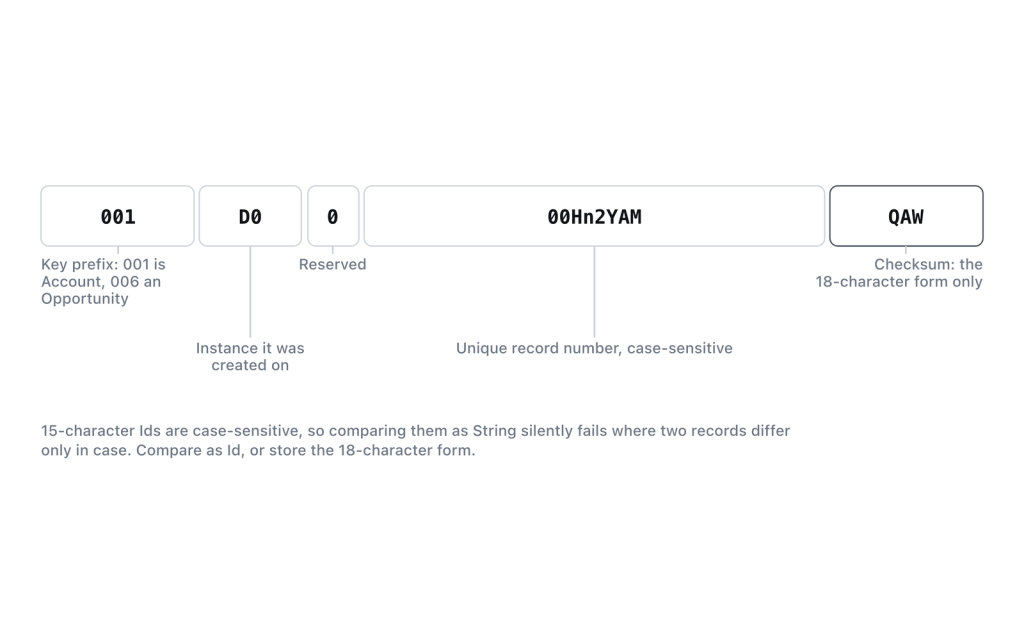
The short answer: stop comparing record Ids as String and compare them as Id. A 15-character Id and its 18-character form are the same record but different strings, so String comparison returns false where Id comparison returns true. If you are getting System.StringException: Invalid id, the value you assigned is not a well-formed Id — wrong length, stray whitespace, or an 18-character Id whose case was edited by hand.
Two formats, one record
The Object Reference is direct about the difference. 15-character Ids are base-62 strings and “these 15-character IDs are case-sensitive“, while “all API calls return an 18-character ID that’s case-safe, meaning that it’s compared correctly by case-insensitive applications.”
The extra three characters are a suffix encoding the case of the preceding 15. Nothing about the record is added — the suffix exists so a system that upper-cases text cannot destroy the Id’s identity. It also means you cannot hand-edit the case of an 18-character Id: change one letter and the suffix no longer agrees with the body, and the platform rejects it.
| Source | Length you get |
|---|---|
| REST, SOAP, and Bulk API responses | 18 |
Apex Id variables and record.Id |
18 |
| Lightning Experience record URLs | 18 |
| Salesforce Classic record URLs | 15 |
| Report columns and report exports | 15, typically |
Formula fields returning Id |
15 |
The mixture is the whole problem. Anything joining API data to report data joins 18 against 15, and the join produces zero matches with no error to explain why.
String comparison fails silently — Id comparison does not
This is the single most useful fact here, and it is in the Apex operators table. For String, “comparison using == is case-insensitive and is performed according to the locale of the context user”. For ID, “comparison using == is case-sensitive and doesn’t distinguish between 15-character and 18-character formats”.
String fifteen  = '0015g00000ABC1d';
String eighteen = '0015g00000ABC1dIAG';

System.debug(fifteen == eighteen);   // false — different strings

Id idFifteen  = fifteen;
Id idEighteen = eighteen;

System.debug(idFifteen == idEighteen);   // true — same record
Nothing throws in the false case. Your code takes the wrong branch, skips the record, or creates a duplicate, and the log shows a comparison that looks perfectly reasonable. That is why “compare as Id” is a rule rather than a preference.
Typing the variable is enough, because assignment does the work. The Apex Developer Guide states it plainly: “If you set ID to a 15-character value, Apex converts the value to its 18-character representation.” The same normalisation is why collections keyed on Id behave correctly and collections keyed on String do not:
Set<Id> ids = new Set<Id>();
ids.add(fifteen);
System.debug(ids.contains(eighteen));      // true

Set<String> strings = new Set<String>();
strings.add(fifteen);
System.debug(strings.contains(eighteen));  // false
If you have ever built a Map<String, SObject> keyed on a record Id, change the key type. It is a latent bug waiting for a 15-character input.
What actually throws Invalid id
System.StringException: Invalid id: 0015g00000ABC1The primitives documentation notes that “all invalid ID values are rejected with a runtime exception”. In practice there are five ways to earn one, roughly in order of frequency:
- Whitespace. A trailing space or newline from a CSV column or a copy-paste. Call
.trim()on anything from outside Apex. - Wrong length. Anything other than 15 or 18 characters, usually a truncated spreadsheet column.
- Hand-edited case on an 18-character Id. Upper-casing it, or “fixing” what looked like a typo, breaks agreement between the body and the suffix.
- An empty string.
Id x = '';throws, whereasId x = null;is fine. Guard withString.isNotBlank(), not!= null. - A value that is not an Id at all. An external system’s key, a name, a number.
Validate at the boundary rather than letting the exception surface from inside a service class:
public static Id parseId(String raw) {
    if (String.isBlank(raw)) { return null; }
    try {
        return Id.valueOf(raw.trim());
    } catch (System.StringException e) {
        throw new IllegalArgumentException('Not a record Id: "' + raw + '"');
    }
}
There is no isValidId() helper in Apex, so a try-catch around Id.valueOf() is the idiomatic check. Regex-matching the shape is worse: it accepts strings with the right shape and the wrong suffix, which then fail later on DML with invalid cross reference id and a far less obvious cause.
The 15-character case trap that never throws
Because 15-character Ids are case-sensitive, 0015g00000ABC1d and 0015g00000abc1D are potentially two different records. Nothing in the format flags a case error, so a 15-character Id that passed through a system which changed its case is still a valid-looking Id — it just points somewhere else, or nowhere.
Combine that with Apex’s case-insensitive String comparison and you get a false positive: two different records’ 15-character Ids, compared as String, can return true. String comparison of 15-character Ids is unsafe in both directions.
For an 18-character Id whose casing was mangled upstream, Id.valueOf(str, restoreCasing) exists for exactly that. There is no equivalent rescue for a 15-character Id, because the information needed to restore it was never there.
Excel, CSV, and the VLOOKUP that finds nothing
Spreadsheets cost the most time here, because there is no error message at all. Just blanks or wrong rows. Two independent problems stack. A report export gives you 15-character Ids and an API export gives you 18, so a lookup across the two matches nothing. And Excel’s lookup functions are case-insensitive, so within a 15-character column two distinct records whose Ids differ only by case are treated as the same key.
Fix it at the source, by making every Id 18 characters before it leaves Salesforce:
- In a report or formula field, wrap the Id in the
CASESAFEID()formula function, which returns the 18-character form, and put that field on the report instead of the raw Id column.CASESAFEID()is expensive in compiled formula size and can push a complex formula over the compile limit, so keep it in a field of its own. - In a query or integration, take the Apex or API value, which is already 18 characters.
- If you must compare 15-character values in Excel, use
EXACT()rather than=, and an arrayMATCHoverEXACT()rather thanVLOOKUP. It works, and it is a workaround. Converting upstream is the fix.
Going the other way, Id.to15() “converts an 18-character Id value to a 15-character case-sensitive string”: useful when an integration insists on 15, and to be avoided otherwise. The Object Reference’s guidance is to “use 18-character IDs in all API calls when creating, editing, or deleting data”.
Preventing recurrence
Type record identifiers as Id everywhere: variables, method parameters, collection keys, Apex properties behind a Lightning component. The moment an Id becomes a String, its length and case start mattering, and neither should. Where a String is unavoidable because the value came from an HTTP request or a file, convert it at the boundary and pass the Id inwards.
For integrations, standardise on 18 characters on both sides and put it in the interface contract. Most “the records didn’t match” tickets between Salesforce and a data warehouse are a 15-versus-18 join, and fixing it after two years of stored keys costs far more than specifying it on day one.
Verified in a Summer ’26 scratch org on 14 September 2026: an Id returned by SOQL measured 18 characters. The 15-character form comes from the UI and from exports, never from the API.
Frequently asked
Can I convert 15 to 18 in Apex without a formula?
Assign the string to an Id variable and Apex converts it, then String.valueOf() it back if you need text. There is no to18() method, because the conversion happens on assignment. Only the reverse direction has an explicit method, Id.to15().
Is an 18-character Id truly case-insensitive?
No, it is case-safe, which is a different claim. It survives passing through a case-insensitive system because the suffix disambiguates it. Deliberately altering its case still makes it invalid, so do not upper-case Ids in a data pipeline “to normalise them”.
Does SOQL accept a 15-character Id in a WHERE clause?
Yes, filtering on Id works with either length, and a bind variable typed as Id is normalised to 18 before the query runs. Where you get caught is a filter on a text field that happens to hold an Id, that is a string comparison with all the string problems.
Why do my formula fields show 15 characters?
Formulas return the 15-character form of Id. Wrap it in CASESAFEID() for 18. If you are building a key for an external system, do that in the field definition rather than downstream.
Should I store 15-character Ids anywhere?
Only where a system you do not control demands it. A 15-character Id stored in a case-insensitive database, a spreadsheet, or a URL some proxy might rewrite is a record reference that can quietly change meaning. Store 18 and convert on the way out if you must.
Reference: Field Types, Salesforce Object Reference; Primitive Data Types and Understanding Expressions and Operators, Salesforce Apex Developer Guide; Id Class, Salesforce Apex Reference Guide; CASESAFEID, Formula Operators and Functions, Salesforce Help.


