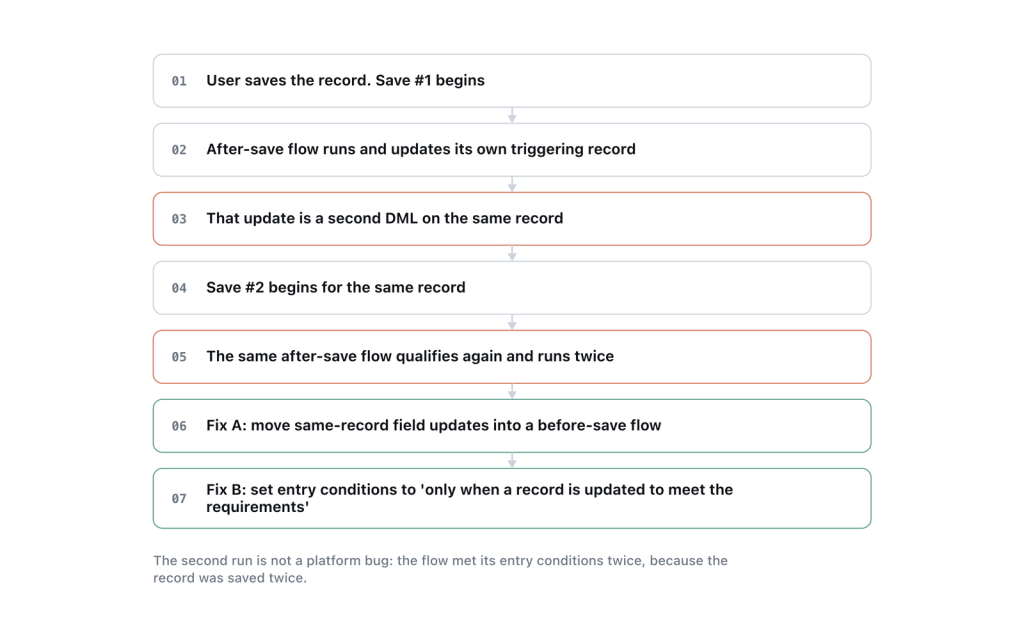
Straight answer: your after-save flow updates the record that triggered it. That second update starts another save on the same record, and the save order runs again, firing your automation a second time. Move same-record field updates into a before-save flow and the second pass disappears.
Flow does have recursion control, and it works: a flow trigger will not re-fire itself on the same record. What it does not prevent is the second save. When an after-save flow writes back to its own record, the record goes through the save order again, and everything else attached to that object gets another turn. That is what you are seeing in the logs.
Why before-save is the fix, not a workaround
A before-save flow changes field values on the record while it is still in memory, before it is written to the database. There is no second DML operation, so there is no second save cycle and nothing to re-fire. It is also considerably faster, because you have skipped an entire additional trip through the save order.
The rule worth internalising: if your automation only changes fields on the record that started the transaction, it belongs in a before-save flow. After-save exists for the things before-save cannot do.
Converting is usually less work than it looks:
- Open the flow and note every field it sets on the triggering record, and the conditions around each.
- Create a new record-triggered flow on the same object, set to run before the record is saved.
- Rebuild the field assignments using an Assignment element on
$Record. No Update Records element is needed — you are editing the record in flight. - Deactivate the old flow rather than deleting it, until you have confirmed the new one behaves.
What does not convert: creating or updating other records, sending emails, calling Apex or external services, and anything on a scheduled path. Those need after-save. If your flow does both, split it — a before-save flow for the field updates on its own record, an after-save flow for everything else.
When it is not that
Before-save conversion solves the common case. Four other patterns produce the same symptom.
Two flows updating each other
Flow A on Account updates a related Contact. A flow on Contact updates the parent Account. Each is correct alone, and together they ping-pong until the platform stops them. Neither flow’s recursion control helps, because each is being fired by the other rather than by itself.
Look for it by listing every active flow on both objects and drawing the writes between them. The fix is almost always to consolidate: one flow per object per timing, rather than several that each know a little about the other.
A flow and an Apex trigger on the same object
The trigger updates the record, the flow fires. The flow updates the record, the trigger fires. The debug log makes this obvious once you look for it, and it is easy to miss for months because each component tests cleanly on its own.
Entry conditions that do not actually restrict
Set your entry conditions, then set the option below them to run the flow only when a record is updated to meet the condition requirements. Without that, the flow runs on every update where the conditions happen to be true, including the update your own flow just made. This single setting is responsible for a surprising share of duplicate executions, because the conditions look correct and the flow still runs repeatedly.
A legacy Workflow Rule field update
Workflow field updates re-enter the save order in much the same way. If an old Workflow Rule is still active on the object, it can be the thing causing your second pass. Check Setup for active Workflow Rules on the object before concluding it is Flow’s fault — these are easy to forget, having been configured years ago by somebody else.
How to find out which one it is
Do not guess from the flow’s design. Get the log.
- Setup → Debug Logs, add a trace flag for your user, and set the Workflow log level to FINER.
- Reproduce the update.
- Open the log and search for
FLOW_START_INTERVIEW. One entry per execution. If you see two, you have confirmed the duplicate rather than inferred it. - Read what sits between them. A
DML_BEGINon the same object between the two interviews tells you a write caused the second save, and the entry immediately before it usually names the culprit.
Also check Setup → Paused and Failed Flow Interviews. Repeated failures at the same element often point at recursion that eventually exhausted a limit.
Confirming you fixed it
Re-run the same trace after the change and count FLOW_START_INTERVIEW entries. One per user action is the target.
Then check it at volume, because recursion and bulk behaviour fail differently. Update 200 records at once through Data Loader and watch for limit exceptions. A flow that recurses twice on one record can breach DML or CPU limits when the batch is large, and that is the failure your users will actually report.
Frequently asked
Does Flow not have recursion protection?
It does, and it prevents a flow trigger from re-firing itself on the same record. It does not prevent the second save that an after-save same-record update causes, which is what re-runs the automation on that object.
Can I use a variable as a guard, the way Apex uses a static?
No. Flow variables do not persist across interviews, so there is nothing for the second run to read. Fix the cause instead of trying to detect it.
Is before-save always better?
For field updates on the triggering record, yes. Faster and no extra save. It cannot create records, send email, call Apex or external services, or use scheduled paths.
Why did this start after a release?
Usually because something else on the object changed, or a package added automation. Check the Setup Audit Trail around the date it started, and diff the list of active automations on that object.
How many flows should one object have?
Few enough that you can reason about the order. One before-save and one after-save per object is a defensible target. Many small flows on one object is how ordering bugs get built.
References: Record-Triggered Flow Considerations and Record-Triggered Automation, Salesforce.


