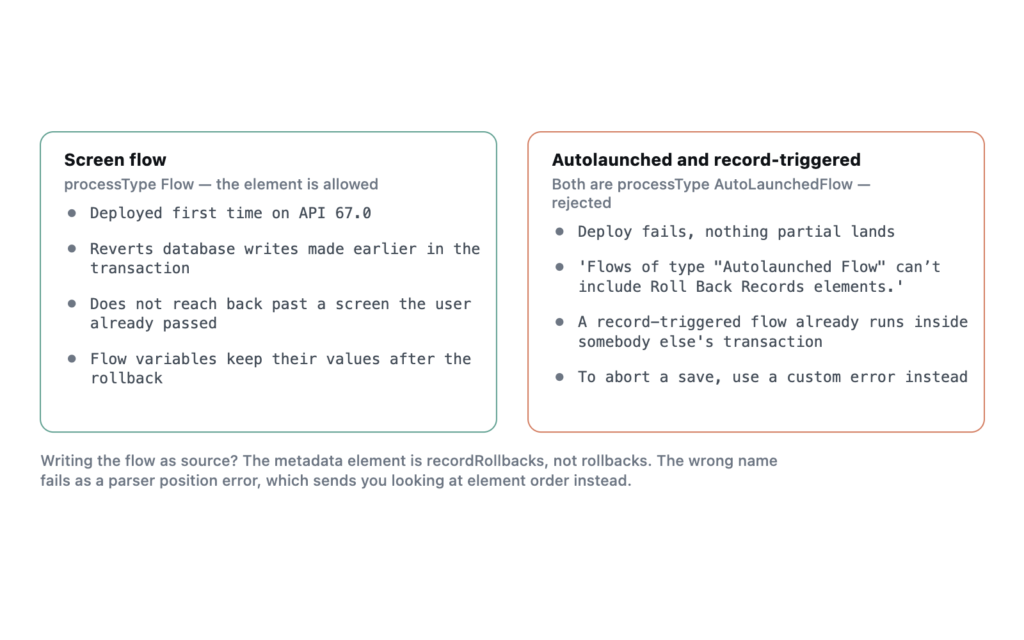
In one sentence: the Roll Back Records element undoes every database change the flow has made so far in the current transaction, and it is available in screen flows only. An autolaunched flow or a record-triggered flow containing one will not deploy.
I built all three variants against my own Developer Edition org on API 67.0, which is Summer ’26, so the errors below are the ones you will actually see.
The screen flow deploys, the other two do not
The same flow, three process types. A Create Records element makes an Account, a Roll Back Records element immediately undoes it.
As a screen flow, <processType>Flow</processType>, it deployed first time.
Status: Succeeded
Created  TA_Rollback_Screen  Flow
Changed to AutoLaunchedFlow and deployed again, it failed. The record-triggered version, which is the same process type with a trigger on the start element, failed identically.
Undo_It (Roll Back Records) - Flows of type "Autolaunched Flow"
can't include Roll Back Records elements.
That is an unusually good error message by Salesforce standards. It names the element, names the process type, and tells you the rule. There is no workaround hiding behind it.
Why the restriction makes sense
A record-triggered flow already runs inside somebody else’s transaction. The save that triggered it is in flight, and letting a flow roll back arbitrary parts of that save would leave the platform’s own order of execution in a state nobody could reason about. If you want a record-triggered flow to abort a save, the tool is a custom error, not a rollback.
A screen flow is different. It is driving its own transaction across one or more screens, and it is the one place where a user can get several steps into a process and then hit something that means none of it should have happened.
What it actually rolls back
The element reverts the database changes made by the flow in the current transaction. It does not undo anything outside the transaction, which rules out most of what people hope it will do.
- Records created, updated or deleted by earlier elements in this run are reverted.
- A callout that has already fired has left the building. Nothing recalls it.
- Emails sent by an earlier element are gone.
- A platform event published with Publish Immediately has already been delivered, which is the same trap in a different costume.
Screen flows also commit at each screen. Work done before a screen the user has already passed is in a committed transaction, and a rollback later in the flow will not reach back across that boundary. This is the part that catches people out, because the flow looks like one continuous process to the person clicking through it.
The metadata element is not called what you would guess
If you are writing the flow as source rather than clicking it together, the element is recordRollbacks. My first attempt used rollbacks, matching the label, and the parser rejected it in a way that gives you nothing to work with.
Error parsing file: Element {http://soap.sforce.com/2006/04/metadata}rollbacks
invalid at this location in type Flow (21:16)
Nothing in that message suggests the name is wrong rather than the position. It reads like an ordering problem, and I spent a minute checking the schema sequence before noticing the name. Element order does also matter in Flow metadata, so both things can bite in the same file.
<recordRollbacks>
    <name>Undo_It</name>
    <label>Undo It</label>
    <locationX>176</locationX>
    <locationY>384</locationY>
    <connector><targetReference>Show_Result</targetReference></connector>
</recordRollbacks>
When to reach for it
The honest answer is rarely. A screen flow that creates several related records and then discovers a problem is the case it was built for, and there it is genuinely the right tool.
Most of the time a rollback is a sign that the flow is validating too late. Checking whether the operation can succeed before you start writing is better design than writing and undoing, and it avoids burning record IDs and automation runs on work you are about to discard. Reach for a rollback when the failure genuinely cannot be known in advance, such as a callout that comes back unhappy after you have already created the local records.
What I have not tested
I verified the deploy behaviour across all three process types and the metadata shape. I have not stepped a user through the screen flow in a browser to watch the Account vanish, so the commit-per-screen behaviour described above comes from the documentation and from previous builds rather than from a run I captured today. If you are depending on that boundary, test it in your own org before you ship it.
Frequently asked
Can I roll back from a subflow? A subflow called from a screen flow runs in the same transaction, so a rollback in the parent covers work the subflow did. An autolaunched subflow still cannot contain the element itself.
Does it work in Apex-called flows? A flow launched from Apex is autolaunched, so no. Use a savepoint in the Apex instead, which is the same idea with better control.
Is there an equivalent for record-triggered flows? A custom error message on the record aborts the save and rolls the transaction back as a side effect, which is usually what people actually wanted.
Does a rollback reset the flow? No. It reverts database changes only. Flow variables keep their values and the flow carries on from the next element, which is worth remembering if your next decision reads a variable holding the ID of a record that no longer exists.


