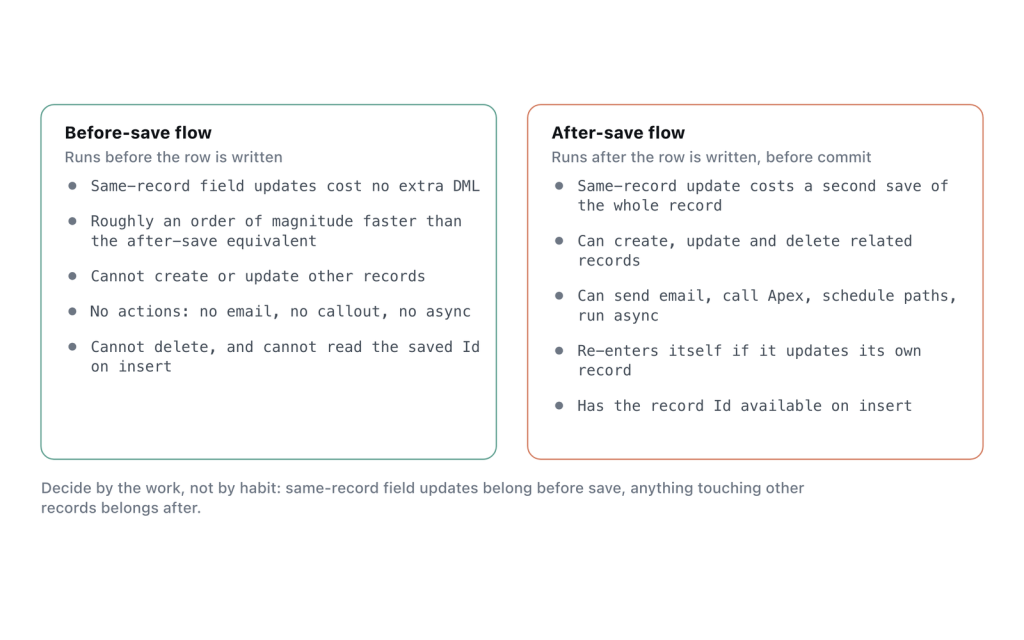
A before-save flow can do exactly one thing: set field values on the record that triggered it. Every other difference between before-save and after-save follows from that single sentence, so the decision is usually made for you by what your automation needs to touch.
The rule: if the only thing your automation does is set fields on the triggering record, it belongs in a before-save flow. If it needs to create anything, notify anyone, call anything, or wait, it belongs after save. When it needs both, you split it into two flows rather than compromising on one.
Why before-save is cheaper, mechanically
A before-save flow modifies the record in memory before it is written. There is no second DML statement and no second trip through the save order, because the record was going to be saved anyway and you changed it in flight.
An after-save flow writing back to its own record does the opposite. That write is a new DML statement, which starts a new save cycle on the same record, which re-runs the automation attached to that object. You pay in DML statements, CPU time, and wall-clock time the user waits at the save button.
Salesforce’s own framing of the gain is in the title of the Spring ’20 release note that introduced the feature, “Update New and Changed Records 10 Times Faster by Using Before-Save Updates in Flows”, measured against an equivalent record-change process. Treat the multiple as an order of magnitude rather than a promise about your org.
The comparison
| Before-save | After-save | |
|---|---|---|
| Position in the save order | Before the before triggers, before validation rules | After the after triggers and after workflow rules, before commit |
| Can change | Fields on the triggering record only | Any record the running context can reach |
| Elements available | Assignment, Decision, Get Records, Loop | All of them |
| Extra DML | None | One statement per Create/Update/Delete element |
| Extra save cycle | No | Yes, when it writes to the triggering record |
| Create records, send email, Apex, callouts, subflows | No | Yes |
| Scheduled and asynchronous paths | No | Yes |
| Record Id available on create | No | Yes |
| Fault paths | Nothing to attach them to | On every element that touches the database |
| How failure looks to the user | The save is rejected | The save is rejected and rolled back, unless a fault path handles it |
| Validation rules see your changes | Yes — they run after you | No — they already ran |
That last row decides more designs than people expect. A before-save default value has to survive the org’s validation rules. An after-save one does not, because validation already happened. If you move a field default earlier and suddenly get validation errors on save, that is not a bug, that is the ordering doing its job.
What before-save costs you
It is on the critical path of the save. A before-save flow that errors does not fail quietly in the background — the user cannot save the record, and the message they get names your flow. There is nowhere to put a fault path, because there is no DML element to attach one to, so your only defence is that the logic cannot fail: null-check everything, and never assume a Get Records returned a row.
It also runs early enough to be overwritten. Roll-up summaries recalculate, workflow field updates fire, and after-save automation runs, all after you. If the value you set keeps reverting, before-save is the wrong place for it.
One thing the order-of-execution documentation does not spell out is exactly how before-save flows behave during the recursive save that a workflow field update causes — it states that before and after update triggers fire again. Assume your before-save logic can run more than once per user action and make it idempotent, which for pure field assignment it usually already is.
What after-save costs you
The second save cycle is the headline cost, and it is where duplicate-execution bugs come from. Beyond that: every after-save flow on the object contributes to the same transaction’s DML statement count (150), and CPU budget (10,000 ms synchronous), and users feel that as save latency on the pages they use most.
Async and scheduled paths relieve the limit pressure, but the thing you give up is consistency. Work moved off the transaction commits separately, can fail separately, and can observe a record that has changed again since it was queued. That is a real trade, not a free upgrade.
Converting an after-save field update to before-save
The mechanical part takes about ten minutes.
- Open the existing flow and list every field it sets on the triggering record, plus the conditions around each one. If the list is empty, there is nothing to convert.
- Create a new record-triggered flow on the same object, with the trigger set to run before the record is saved and the same entry conditions.
- Replace the Update Records element with an Assignment element operating on
$Record— for example, set$Record.PrioritytoHigh. No Update Records element is needed at all. You are editing the record before it is written. - Rebuild the Decision elements as-is. They work identically.
- If the flow used
$Record.Id, check what for. On create it is empty in a before-save flow, so anything keyed off the record’s own Id has to stay after save. - Activate the new flow, deactivate the old one rather than deleting it, and re-test the create path and the update path separately.
Verify with a debug log, not by eye. Trace with the Workflow category at FINER, save one record, and count the DML_BEGIN entries for that object. The conversion worked when the second one is gone.
Where the obvious answer is wrong
You need the record’s Id at creation. Stamping an external key or building a URL for a child record needs the Id, which does not exist yet in a before-save create. After-save, or a before-save flow on the later update.
The field depends on something computed later. Anything derived from roll-up summaries or from other after-save automation cannot be set before those things run. Setting it early looks correct in debug and wrong in production.
You want to block a save with a readable message. The reflex is a validation rule, but a before-save flow with a Custom Error element gives you the same block with conditional logic you can actually maintain, and the error can be attached to a specific field. This is the case where “use before-save for field updates only” is too narrow a rule.
Frequently asked
Can a before-save flow use Get Records?
Yes, and it is the supported way to read related data: Assignment, Decision, Get Records, and Loop are all available. What it cannot do is write to what it read.
Does a before-save flow fire other automation when it changes a field?
No extra automation, because there is no extra save. Everything later in the same save order (validation rules, triggers, after-save flows) sees the value you set, as though the user had typed it.
Should I split one flow into a before-save and an after-save flow?
Yes, when it currently does both jobs. Two flows with clear timing beat one flow with an Update Records element pointed at its own record. Keep it to one flow per object per timing so the ordering stays reasonable.
Which one runs on delete?
Neither of these. Delete is its own trigger type, and it runs before the record is deleted. There are no field updates to make.
Is after-save ever faster?
Not for the same work. It is only “faster” in the sense that async and scheduled paths move work out of the user’s transaction. The total work goes up, the wait goes down.
References: Triggers and Order of Execution, Apex Developer Guide. Plus the Salesforce Help documents “Before-Save Record-Triggered Flows”, “Record-Triggered Flow Considerations”, and the Spring ’20 release note “Update New and Changed Records 10 Times Faster by Using Before-Save Updates in Flows”.


