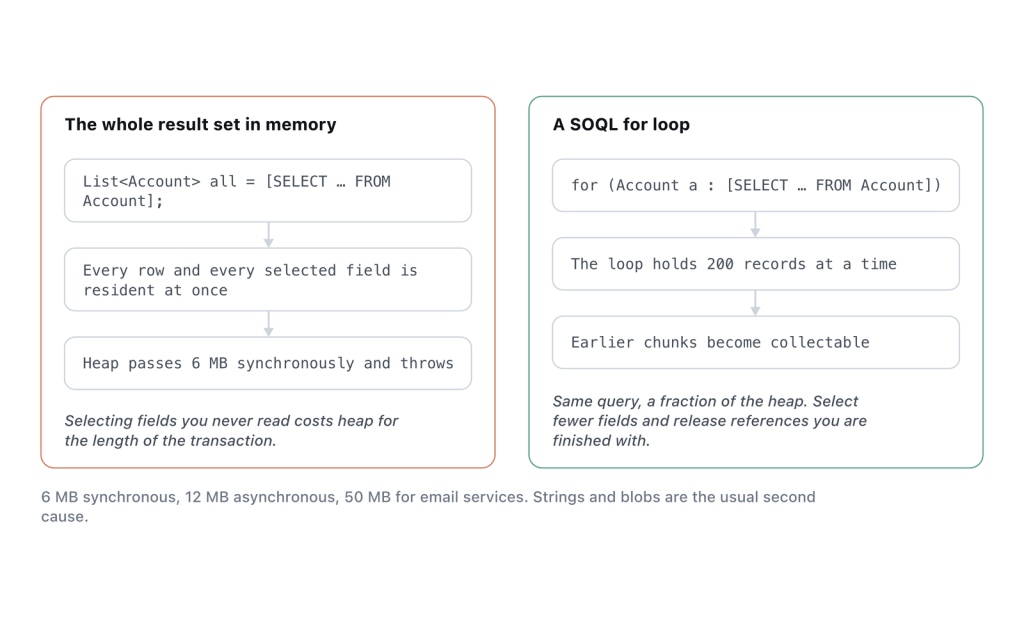
The short version: your transaction is holding more than 6 MB of data in memory at once (12 MB asynchronously). Stop materializing whole query results into a List — iterate with a SOQL for loop so only 200 records are resident at a time, select fewer fields, and release references to collections you have finished with. If you are building a large string or handling file data, that is almost certainly where the 6 MB went.
What counts toward heap, and what the ceiling actually is
Heap is everything your Apex is holding onto right now: collections, sObjects, strings, blobs, and every object instance still reachable from a variable. It is a high-water mark within the transaction, not a running total — freeing memory genuinely helps, unlike the DML or query-row counters which only ever go up.
| Context | Heap limit |
|---|---|
| Synchronous Apex | 6 MB |
| Asynchronous Apex (future, queueable, batch, scheduled) | 12 MB |
| Email services | 50 MB |
That 50 MB for email services is the only genuinely generous heap figure on the platform, and it exists because inbound email handlers receive attachments. It is not a workaround you can route other work through.
Estimating heap by eye is unreliable, so don’t. A retrieved sObject carries more overhead than the sum of its field values, and a Map costs more than the objects it holds. Measure with Limits.getHeapSize() instead of reasoning about byte counts.
Cause 1: assigning a large query result to a List
This is the most common shape by a wide margin. 20,000 Accounts with fifteen fields each will not fit in 6 MB.
// Every record resident simultaneously.
List<Account> accounts = [
    SELECT Id, Name, BillingStreet, BillingCity, Description, /* ... */
    FROM Account WHERE Active__c = true
];

for (Account a : accounts) {
    a.Rating__c = score(a);
}
update accounts;
The sObject-list form of the SOQL for loop holds one chunk of 200 at a time:
for (List<Account> chunk : [
    SELECT Id, Name, Active__c FROM Account WHERE Active__c = true
]) {
    for (Account a : chunk) { a.Rating__c = score(a); }
    update chunk;
}
Note that the field list shrank too, and that matters as much as the loop. Every column you select is carried for every row. Dropping a long Description field from a 20,000-row query can halve heap on its own. Select what the code reads, nothing else.
Be clear about what this does and does not fix. The for loop solves heap. It does not reduce the number of records retrieved, so if you are also near the 50,000 query-row limit, this rewrite leaves that problem exactly where it was.
Cause 2: string concatenation in a loop
Strings in Apex are immutable. Each += allocates a new string containing the whole accumulated value, so building a 2 MB CSV one row at a time allocates far more than 2 MB before it finishes.
String csv = '';
for (Contact c : contacts) {
    csv += c.FirstName + ',' + c.LastName + '\n';   // reallocates every pass
}
Collect the pieces and join once:
List<String> rows = new List<String>();
for (Contact c : contacts) {
    rows.add(c.FirstName + ',' + c.LastName);
}
String csv = String.join(rows, '\n');
That removes the reallocation churn but the finished string still occupies heap, and so does the List until you release it. For genuinely large exports, the answer is not a better string builder — it is to generate the file in chunks across a Batch Apex job, appending to a ContentVersion per chunk, and accept that the file is not ready the moment the user clicks the button.
Cause 3: file and blob data
A Blob occupies its full size in heap, and base64 encoding it inflates it by roughly a third. Read a 4 MB attachment and encode it for a callout in synchronous Apex and you are finished before you start.
// One 4 MB file, then a ~5.5 MB encoded copy of it, both resident.
ContentVersion cv = [SELECT VersionData FROM ContentVersion WHERE Id = :cvId];
String encoded = EncodingUtil.base64Encode(cv.VersionData);
Two things help. Do file work asynchronously for the 12 MB ceiling — that is one of the few cases where async is a real fix rather than a stay of execution. And never query VersionData for more than one record at a time. A query returning ten file bodies is ten blobs in memory.
Cause 4: parsing a large callout response
An HTTP response body arrives as a string, and deserializing it produces a second structure holding the same data. Both are live at once.
HttpResponse res = new Http().send(req);
String body = res.getBody();                          // copy one
List<Object> parsed = (List<Object>) JSON.deserializeUntyped(body);   // copy two
Use JSON.createParser() to walk the response and keep only the fields you need, or ask the remote system for a paginated endpoint. Requesting smaller pages is the fix that actually scales. Parser streaming just moves the ceiling.
Cause 5: static variables and accumulating caches
Static variables live for the whole transaction. A static Map used as a cache is a fine idea that becomes a heap problem when it caches per-record data across a 200-record trigger batch and then survives into every subsequent re-entry of that trigger.
Cache describe results and configuration: small, bounded, reused. Do not cache records. And when you finish with a large collection mid-transaction, drop the reference:
List<Contact> staging = buildStagingRecords();
insert staging;
staging = null;   // eligible for collection; heap can fall
This works because heap is a high-water mark, but it only works if nothing else still points at the data. Setting one variable to null while a Map elsewhere holds the same objects frees nothing. There is no way to force collection, so treat this as removing an obstacle rather than issuing a command.
Diagnose it
Print the number at boundaries. Heap errors are almost always localized to one method, and three debug lines will find it faster than reading the class:
System.debug('Heap: ' + Limits.getHeapSize()
    + ' of ' + Limits.getLimitHeapSize());
Then set the Apex Code log level to FINEST and read the CUMULATIVE_LIMIT_USAGE block at the end of the log. It reports maximum heap size alongside the other limits, and the LIMIT_USAGE_FOR_NS lines split it per namespace, which tells you whether an installed package is holding the memory. That distinction is worth establishing before you refactor anything of your own.
If your heap error is in a Visualforce controller, check view state separately. View state is a different limit with a different cause, and the transient keyword on instance variables that only matter within a single request is the standard fix. Collections rebuilt on every page load have no business being serialized into the form.
Confirm the fix
Assert an absolute heap ceiling against a realistic record count:
@IsTest
static void scoringHoldsConstantHeap() {
    List<Account> accounts = new List<Account>();
    for (Integer i = 0; i < 200; i++) {
        accounts.add(new Account(Name = 'Bulk ' + i, Active__c = true));
    }
    insert accounts;

    Test.startTest();
    AccountScoringService.run();
    Integer peak = Limits.getHeapSize();
    Test.stopTest();

    System.assert(peak < 2000000, 'Heap scales with record count: ' + peak);
}
Pick a bound well below 6 MB. 2 MB leaves room for the automation that production has and your test org does not. An assertion at 5.9 MB tells you nothing useful.
Preventing the next one
- Never assign an unbounded query to a variable. If the result set size depends on org data volume rather than the trigger batch, iterate it.
- Select the fields you read.
SELECTlists that grew by accretion are free heap savings. - One blob at a time, and do file work asynchronously.
- Statics hold describes and config, never records.
- Assert
Limits.getHeapSize()in the tests covering any code that builds strings, handles files, or parses responses.
Measured in a Summer ’26 scratch org on 14 September 2026: the same five-field query over 166 Accounts consumed 10,739 bytes of heap as a list assignment against 162 bytes as a SOQL for-loop. Limits.getLimitHeapSize() returned 6,000,000 in synchronous context.
Frequently asked
Does moving to a future method or batch job fix it?
It doubles the ceiling to 12 MB, and for file or parsing work that is often enough to be a genuine fix. For code whose memory use scales with org data volume it only postpones the failure. What you trade is immediacy: the caller no longer knows whether the work succeeded, so you need your own status reporting.
Why does the same code pass in my sandbox and fail in production?
Heap tracks data volume. A query that returns 400 records in a sandbox returns 90,000 in production, and nothing about the code changed.
Does a SOQL for loop reduce heap?
Yes, and that is its main purpose. The sObject-list form processes 200 records per iteration, so only one chunk is resident. It has no effect on the 50,000 query-row limit.
Do System.debug() statements consume heap?
The string you build to pass into the call does. Debug statements that concatenate large collections into a message are worth removing from hot paths. Including ones whose output you never read because the log level filters them out.
Is the heap limit adjustable?
No. 6 MB synchronous and 12 MB asynchronous are fixed. The 50 MB email-services figure is a property of that specific context, not a setting.
Reference: Per-Transaction Apex Limits, SOQL For Loops, Using the transient Keyword, and Debug Log, Salesforce Apex Developer Guide.


