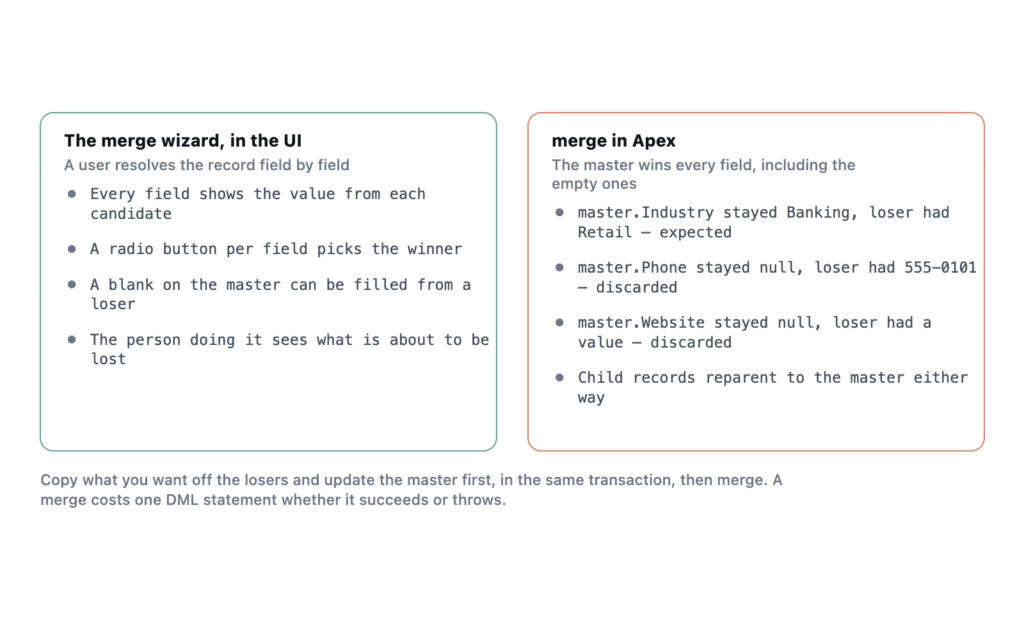
The two facts people get wrong: an Apex merge keeps the master record’s value for every field, blank ones included, and a single merge can involve at most three records in total. Neither matches what the merge wizard in the UI does, which is where the expectation usually comes from.
I ran all of this as anonymous Apex in my own Developer Edition org on API 67.0, which is Summer ’26, against fabricated Accounts.
Blank fields on the master stay blank
The test is small. Create a master with an Industry and nothing else. Create a loser with a Phone, a Website and a different Industry. Merge them and read the master back.
Account master = new Account(Name='TA MergeB Master', Industry='Banking');
Account loser  = new Account(Name='TA MergeB Loser', Phone='555-0101',
                             Website='https://example.invalid', Industry='Retail');
insert new List<Account>{ master, loser };
merge master loser;
Reading the master back afterwards shows what survived.
master.Industry= Banking   (loser had Retail)
master.Phone   = null      (master was blank, loser had 555-0101)
master.Website = null      (master was blank, loser had a value)
Industry behaving that way is expected. The master wins a contested field, and nobody is surprised.
Phone and Website are the ones that catch people. There was no conflict to resolve on either field. The master held nothing, the loser held a real value, and the merge threw that value away along with the record. If you came to this from the Accounts merge wizard, where a user ticks a radio button per field and can happily pull the phone number off the losing record, that is a genuinely different behaviour wearing the same word.
You will find the opposite stated in plenty of places, including vendor documentation for dedupe tools, usually along the lines that blank fields on the master are populated from the losing records. That is the wizard’s behaviour and the behaviour those tools implement themselves. It was not what Apex did here.
My first thought was that I had caused it, by passing a master sObject that carried explicit nulls for Phone and Website and so overwrote them. That turned out to be wrong. I reran the test three ways.
CASE 1 (full in-memory master, blanks present) -> Phone=null Website=null
CASE 2 (Id-only master stub)                   -> Phone=null Website=null
CASE 3 (Id-only master, merge by loser Id)     -> Phone=null Website=null
Passing a stub carrying nothing but the Id made no difference, and neither did merging by the loser’s Id rather than the sObject. So if you are deduplicating in Apex and you care about the data on the losing records, you have to copy it across yourself, before the merge, in the same transaction.
if (String.isBlank(master.Phone)) master.Phone = loser.Phone;
if (String.isBlank(master.Website)) master.Website = loser.Website;
update master;
merge master loser;
Three records per merge, and the error says so
Passing three losers to one master throws immediately, and the message is worth quoting in full because its arithmetic is confusing.
System.DmlException: Merge failed. First exception on row 0 with id 001dN000012nsKZQAY;
first error: LIMIT_EXCEEDED, A single merge request cannot involve more than 3 records,
including the master record, had 3 for master record 001dN000012nsKZQAY
Read the wording carefully, because it is doing something slightly odd. The ceiling of three counts the master, so the most you can pass is two losers. The “had 3” in the message is counting the losers rather than the total, which makes the sentence read as though three were allowed and three were supplied.
That is the whole reason a dedupe routine over a cluster of six duplicates has to loop. You merge two at a time into a surviving master and keep going.
A failed merge still spends a DML statement
This is the part worth knowing before you write the loop. Reading Limits.getDmlStatements() either side of the failed three-loser attempt showed the counter going up anyway.
- The merge that threw
LIMIT_EXCEEDEDconsumed one DML statement and one DML row. - The merge that succeeded consumed one DML statement and one DML row.
A merge costs the same whether it works or not. Catching the exception does not refund it. In a batch that merges duplicate clusters you are budgeting against the 150 DML statement limit with one statement per merge, so 150 merges is the hard ceiling for a single transaction, and a cluster of six duplicates costs you five of them.
Note also that a merge counts as one DML row, not one per record involved. That keeps you well clear of the 10,000 row limit, so statements are the budget that binds here.
Children move, and the losers are recoverable
A Contact sitting on the losing Account was reparented to the master automatically. That is the behaviour you want and it is the main reason to use merge rather than a copy-then-delete of your own.
The losing record is deleted rather than destroyed. Querying for it normally returned nothing, and the same query with ALL ROWS found it:
loser rows visible=0 inclDeleted=1So a bad merge is recoverable from the recycle bin for the retention window, with the caveat that undeleting the loser does not put the reparented children back. You get the record, not the relationships. Test the routine on a sandbox copy before you point it at production.
Duplicate rules do not stop any of this
My org has two active DuplicateRule records, the standard ones on Account and Contact. They govern what happens when somebody tries to create a duplicate. They have no involvement in merging the duplicates you already have.
Those two jobs get conflated constantly. Duplicate rules and matching rules are prevention, and they work at the point of insert or update. Cleaning up the back catalogue is a separate exercise with separate tooling, whether that is the Potential Duplicates component, a Data Loader round trip, or Apex like the above. Turning on duplicate rules does nothing to the records already sitting there.
What I have not tested
I ran this on Accounts only, against two fields, on Summer ’26. Merge is supported on a short list of objects, and Leads and Cases carry their own conversion and closure semantics that I have not put under the same microscope. I also used a lookup child rather than a master-detail one, so check that before assuming reparenting behaves identically. Given how widely the opposite is stated, I would welcome a counter-example from another org.
Frequently asked
Do triggers fire on a merge? Yes. The master gets update triggers and the losers get delete triggers, which is a common source of surprise recursion in a dedupe batch. Guard accordingly.
Can I merge records owned by different users? Yes, with the usual access requirements. The surviving record keeps the master’s owner.
Is Database.merge different from the merge keyword? Only in error handling. Database.merge takes an allOrNone flag and returns a result object rather than throwing, which is what you want inside a loop over many clusters.
Does this apply to the Bulk API? Merge is not a Bulk API operation. High-volume deduplication runs through Apex or through a tool that calls the SOAP merge call one request at a time, which is the practical constraint on how fast you can clean a large org.