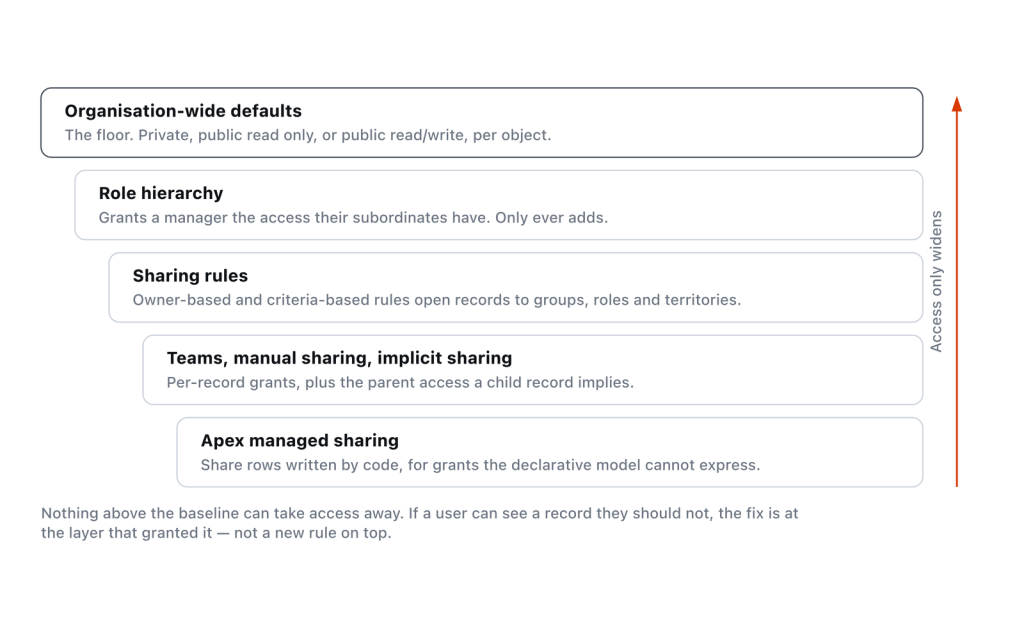
An org-wide default answers exactly one question — what can a user do with a record they don’t own and have no other claim to? Every other sharing feature only adds access on top of that answer. So set the OWD by deciding what your least-privileged user should see, then grant upward with roles, sharing rules, and teams.
Start with what the non-owner sees
The setting lives at Setup → Sharing Settings → Organization-Wide Defaults → Edit, and it is per object. Salesforce Help describes each level in terms of the non-owner, which is the only useful way to read them:
| Value | What a user who doesn’t own the record gets | Where it’s available |
|---|---|---|
| Private | Nothing. “Only the record owner, and users above that role in the hierarchy, can view, edit, and report on those records.” | Most objects |
| Public Read Only | Read and report, no edit. Editing stays with the owner and their management chain. | Most objects |
| Public Read/Write | “All users can view, edit, and report on all records.” | Most objects |
| Public Read/Write/Transfer | Read, edit, report, and change the owner. “Only available for cases or leads.” | Case, Lead |
| Public Full Access | Read, edit, transfer, delete, report. “Only available for campaigns.” | Campaign |
| Controlled by Parent | Whatever they can do on the parent record, and nothing independent of it | Master-detail children, Contact, Order |
| Use / View Only / No Access | Price book variants — Use allows adding a price book to an opportunity, View Only allows viewing and reporting | Price Book |
Notice that Private and Public Read Only both hand edit rights to “the owner, and users above that role in the hierarchy.” The hierarchy is not an exception to the OWD — it is part of what the OWD sentence already grants. That catches people who set Private and then discover a VP can still edit everything.
OWD is a floor, and the docs say so twice
Organization-Wide Sharing Defaults states it once, generally: “Other record access features can only be used to grant additional access—they can’t be used to restrict access to records beyond what was originally specified with the organization-wide sharing defaults.” Sharing Rule Considerations then repeats it specifically: “You can use sharing rules to grant wider access to data. You can’t restrict access below your organization-wide default levels.”
The same one-way logic runs through the rest of the model. Record-Level Access: Under the Hood explains that when a user has more than one grant on a record, “Salesforce uses the most permissive grant when determining record access.” There is no subtract operation. Nothing you configure downstream can walk an OWD back.
This has a consequence at the database level that explains why Public Read/Write feels so cheap and is so hard to leave. The same guide notes that most objects get their own sharing table, but not objects set to Public Read/Write — there is no point storing grants when everyone already has access. Set an object to Public Read/Write and you are not just granting broad access, you are opting out of having a sharing mechanism for it at all.
Private plus sharing rules is the model that scales
Salesforce’s own sharing cheatsheet states the approach plainly: “lock down your data to the most restrictive level, and use record-level security and sharing tools (such as roles, sharing rules, and manual sharing) to give access.” I agree with it, and the reason is structural rather than ideological. A Private OWD gives you a place to express intent. Every grant is a named, auditable object (a rule, a team, a share row with a row cause), and you can answer “why can this person see this record” by reading it.
Public Read/Write gives you nowhere to put that intent. Access is not recorded anywhere, so it cannot be reviewed, and the day someone asks for one team’s records to be hidden, the answer is a migration rather than a change.
Private is not free. You get a ceiling: 300 sharing rules per object, of which at most 50 can be criteria-based or guest user rules. You get recalculation windows — the internal OWD page warns that “if you have a lot of data, the update can take longer,” and that decreasing access takes effect only after recalculation runs. You get group membership locking, which Designing Record Access for Enterprise Scale describes as the source of “could not acquire lock” and “Group membership operation already in progress” errors during role changes, bulk loads, and quarter-end realignments. And you get a design obligation: someone has to know, and keep knowing, why each rule exists.
Retrofitting Private onto a Public org is the expensive version
Going the other direction, from Public Read/Write to Private on a live object with millions of rows, is the project people underestimate, and the cost is not the recalculation. It’s discovery.
Before you tighten anything you have to enumerate every access path currently working by accident: report folders whose audience assumed universal read, list views built on records the viewer no longer sees, integration users sitting in no role, Apex running with sharing that has never once been filtered, and lookups on other objects that quietly become invisible. None of these throw an error when the OWD changes. They return fewer rows.
The workable sequence: build the sharing rules first, then flip the OWD, so the grants exist before the floor drops. Do it object by object, in a sandbox with production-shaped data, and run it as a release rather than a Tuesday afternoon. If you cannot get production-shaped data into a sandbox, say so before committing to a date. Recalculation behaviour on a wide object above 50 million rows is hard to predict from a small sample.
Controlled by Parent removes the child’s sharing entirely
The official description is worth reading literally: “A user can perform an action (such as view, edit, or delete) on a contact or order based on whether he or she can perform that same action on the record associated with it.”
Detail records in a master-detail relationship do not get a sharing table of their own. So there is nothing to configure on the child: no sharing rules, no manual shares, no OWD to loosen. Every access question about the child is a question about the parent. When a user cannot edit a child record, stop looking at the child.
One detail that catches people during data model changes: break a master-detail relationship and the detail custom object reverts to Public Read/Write, with Grant Access Using Hierarchies selected. Converting a relationship therefore opens the object up by default. Check the OWD immediately after.
External access is a second, separate floor
If your org was created in Spring ’20 or later, or you have Experiences or portals enabled, this is already on. External org-wide defaults are enabled automatically in those cases. Each object then carries a Default Internal Access and a Default External Access, and the constraint is one-directional: “The default external access level must be more restrictive or equal to the default internal access level.” External levels are limited to Controlled by Parent, Private, Public Read Only, and Public Read/Write.
Two things about it are easy to get wrong. First, guest users are not external users in this sense. Their defaults are Private for every object and cannot be changed. Guest access is a separate conversation involving guest user sharing rules, which are read-only by design. Second, the external sharing model is a one-way door: “After it’s enabled, the External Sharing Model can’t be disabled.” You can set internal and external to the same value per object, which is functionally equivalent, but the two columns stay in your Sharing Settings forever.
Also worth knowing before you loosen external access to make a report work: an object’s external OWD must be Private for external authenticated users to see it in reports. Loosening is the wrong lever there.
View All and Modify All sit outside all of this
The permissions documentation is blunt: “The ‘View All’ and ‘Modify All’ permissions ignore sharing rules and settings, allowing administrators to grant access to records associated with a given object across the organization.” OWD, roles, sharing rules. None of it applies to a user holding those permissions on that object.
So when you are debugging “why can this user see this record,” check object permissions before you check sharing. A permission set with View All Records on Account makes your entire Account sharing design decorative for whoever holds it.
They stop at the field boundary, though. The same page notes that View All Data, Modify All Data, and the per-object variants “don’t override field-level security“. A user still needs field permissions or View All Fields on the object. That’s useful: you can grant broad record visibility to a support or audit role while keeping compensation fields hidden.
Prefer the object-scoped View All Records over the org-wide View All Data every time. It is narrower, it shows up in a permission set audit as a named object, and it does not silently follow the user onto every new object you build next quarter.
Frequently asked
Does changing the OWD delete existing manual shares?
Loosening does, eventually. Widening an OWD takes effect immediately, and once recalculation finishes Salesforce asynchronously removes manual and rule-based shares that have become redundant. The OWD now grants that level anyway. Tightening behaves differently: the change takes effect only after recalculation completes. Salesforce emails you when it finishes. Track progress on the Background Jobs page and confirm what changed in Setup Audit Trail.
Why can a user still edit records after I set the OWD to Private?
Three usual causes, in order: they hold View All Records or Modify All Records on the object, they sit above the owner in the role hierarchy, or a sharing rule grants Read/Write to a group they belong to. Check object permissions first, that path ignores sharing entirely.
Can I set an OWD more restrictive than Private?
No. Private is the floor for record access. To scope read access further you need restriction rules, which narrow what a user sees within the records they already have access to: a different mechanism from the OWD, and one that can subtract.
Do I need sharing rules if the OWD is Public Read/Write?
No, and mostly you cannot use them meaningfully. Sharing rules exist to make exceptions to a restrictive default. The considerations page notes they require the OWD set to Public Read Only or Private. On a Public Read/Write object every user already has read and edit.
How do I decide between Private and Public Read Only?
Ask whether an unrelated colleague seeing the record is a problem, or only editing it. If read is harmless and you mainly want to protect data quality and ownership, Public Read Only is simpler and cheaper to run. If a record’s existence is itself sensitive (recruiting, legal, deal desk) it has to be Private, because there is no way to hide rows under Public Read Only.
Reference: Organization-Wide Sharing Defaults, Organization-Wide Default Access Settings, Set Your Internal Organization-Wide Sharing Defaults, Set Your External Organization-Wide Sharing Defaults, Sharing Rules, Sharing Rule Considerations, “View All” and “Modify All” Permissions Overview, Database Architecture and Sharing Rows (Record-Level Access: Under the Hood), Tips and Hints for Sharing Data, and Guidelines for Success with Roles.


